LTO Certificate of Registration Guide 2026
Most Filipino vehicle owners know they need to carry their OR/CR at all times. But ask them what every field on their Certificate of Registration actually means and many will struggle to answer.
That lack of understanding causes real problems. Errors on your LTO certificate of registration go unnoticed until they cause trouble at a checkpoint, during a vehicle sale, or when you try to renew your registration. By then, fixing them takes far longer than it would have at the counter.
This complete 2026 guide explains exactly what the LTO Certificate of Registration is, what every field on the sample format means, how the new 2021 CR looks different from the old one, and what to do if yours is lost, damaged, or contains an error.
What Is the LTO Certificate of Registration?
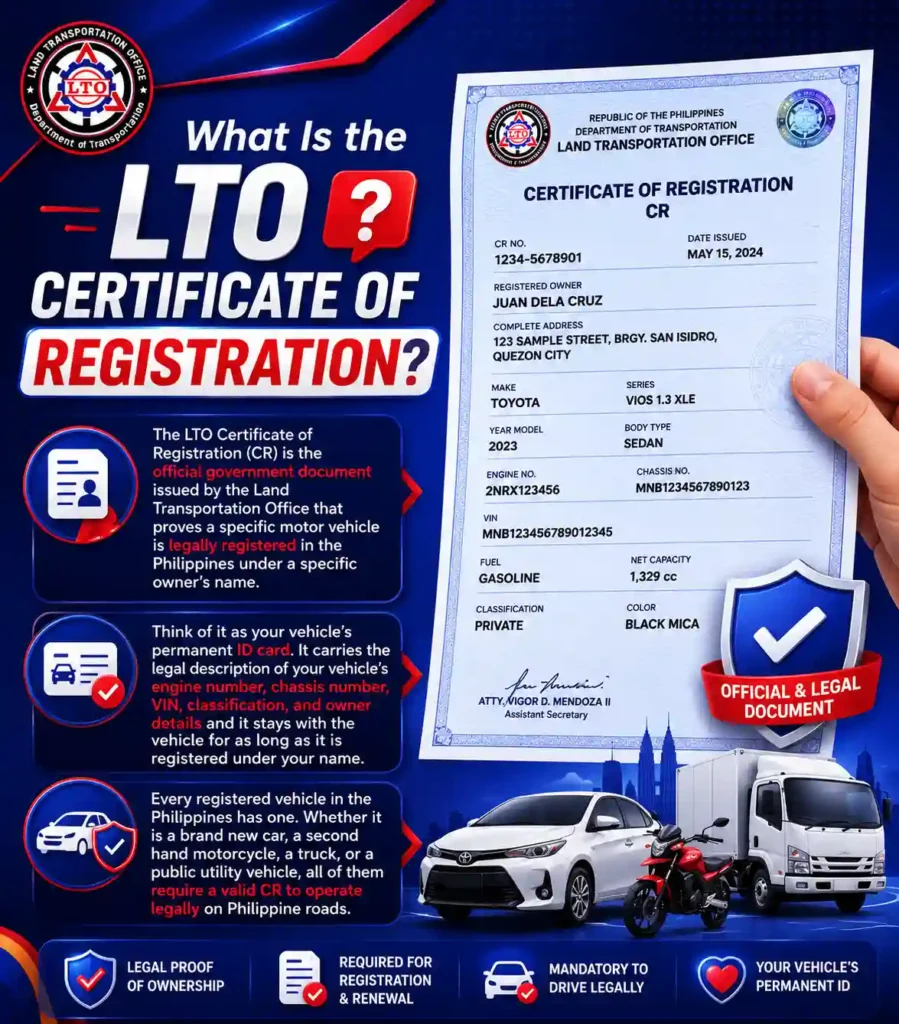
The LTO Certificate of Registration (CR) is the official government document issued by the Land Transportation Office that proves a specific motor vehicle is legally registered in the Philippines under a specific owner’s name.
Think of it as your vehicle’s permanent ID card. It carries the legal description of your vehicle’s engine number, chassis number, VIN, classification, and owner details and it stays with the vehicle for as long as it is registered under your name.
Every registered vehicle in the Philippines has one. Whether it is a brand new car, a second hand motorcycle, a truck, or a public utility vehicle, all of them require a valid CR to operate legally on Philippine roads.
Important Reminder:
Driving without your CR can result in fines and possible vehicle impoundment during an LTO checkpoint. Always carry the original, a photocopy is generally not accepted as a substitute.
Difference Between CR vs OR
Many Filipino motorists use the terms OR and CR interchangeably, but they are two completely different documents that serve different purposes. Here is a clear differentiation between the two:
| Feature | OR (Official Receipt) | CR (Certificate of Registration) |
|---|---|---|
| What It Proves | That you paid your annual registration fees | That your vehicle is legally registered and identified |
| How Often Issued | Every year during registration renewal | Once — permanent until ownership changes |
| Does It Expire? | Yes — annually | No — the CR itself does not expire |
| What It Contains | Payment details, renewal date, sticker info | Vehicle details, owner info, engine/chassis numbers |
| When You Need It | Annual renewal, insurance claims, checkpoints | Checkpoints, vehicle sale, ownership transfer, loan applications |
Together, these two documents form what is commonly known as the OR/CR, the standard proof of legal vehicle registration in the Philippines. You must carry both together whenever you are driving.
Internal link:Learn how to renew your LTO registration and get a new OR every year.
The New LTO Certificate of Registration Format (2021 Update)
The LTO revised the CR format on February 15, 2021, as part of the rollout of the LTMS (Land Transportation Management System). If your vehicle was registered or had its ownership transferred after that date, you have the new CR. If your vehicle was registered before then, you still carry the old format.
Here is what changed:
What the New CR Looks Like
The original CR was a small, palm-sized yellow card, compact enough to fit in a wallet but notorious for its tiny fonts and limited information fields. The new CR is significantly larger, roughly the size of a PSA birth certificate, printed on white paper with blue watermarks and security features.
The LTO made it larger specifically to accommodate more vehicle details and to increase the font size so information is clearly readable at checkpoints and during transactions.
What Was Added to the New CR
- Vehicle Identification Number (VIN): A standardized 17-character code that uniquely identifies your vehicle globally
- Vehicle Type: Now standardized as Car, UV, SUV, Bus, Truck, Motorcycle/Tricycle, or Trailer
- PNS Vehicle Category: Aligned with Philippine National Standards classifications (L1, L2, M1, N1, etc.)
- Vehicle Color: Brought back after being absent from older formats
- Passenger Capacity: Especially important for For Hire vehicles
- Year Rebuilt: For rebuilt or reconditioned vehicles
- Max Power in kilowatts: For electric vehicles (EV)
- Classification field: Now clearly states Private, For Hire, Government, or Exempt
What Was Removed from the New CR
- Denomination: Replaced by the clearer Vehicle Type field
- Body Number: Removed since the CR already carries engine and chassis numbers
- Shipping Weight: No longer required in the standard format
- Net Capacity: Removed
- Number of Cylinders: Removed from the face of the document
Pro tip:
If you are buying a secondhand vehicle registered before February 2021, the seller will have the old yellow card format. Both formats are legally valid. Always cross-check the engine and chassis numbers on the CR against the physical stencils on the vehicle before completing any transfer.
LTO Certificate of Registration Sample (Every Field Explained)
Here is a complete overview of the fields you will find on the new 2021 LTO certificate of registration sample, so you know exactly what each one means:
| CR Field | Where It Comes From | Why It Matters |
|---|---|---|
| Date Issued | Date your CR was printed and released by LTO | Confirms when registration was processed |
| MV File Number | Assigned at first registration; found on OR/CR | Primary tracking number for the LTO Tracker and plate status checks |
| Plate Number | Assigned by LTO after plate manufacturing | Your vehicle’s legal identifier on the road |
| Owner Name | Full legal name as registered with LTO | Must match your government ID exactly. Any mismatch causes delays |
| Address | Address on file with LTO at time of registration | Used for official notices & updates if you move |
| Engine Number | Alphanumeric code stamped on your engine block | Verified at checkpoints and during ownership transfer |
| Chassis Number | Structural serial number of the vehicle frame | Verified against the physical stencil on the vehicle body |
| VIN | 17-character global identifier (new format only) | International standard vehicle identifier added in the 2021 update |
| Vehicle Type | Car, UV, SUV, Bus, Truck, MC/TC, or Trailer | Replaced old ‘Denomination’ field in 2021 |
| Vehicle Category | PNS code: L1, L2, M1, N1, etc. | Based on Philippine National Standards; determines license restriction codes |
| Classification | Private / For Hire / Government / Exempt | Determines applicable rates, rules, and restrictions |
| Vehicle Color | Color declared at registration | Re-added in 2021 update; used for physical verification |
| Year Model | Year the vehicle was manufactured | Used to calculate registration fees and emission compliance |
| Year Rebuilt | Year of major rebuild, if applicable | Relevant for reconditioned and rebuilt vehicles |
| Fuel Type | Gasoline / Diesel / Electric / Hybrid | Affects emission testing requirements and applicable standards |
| Passenger Capacity | Number of passengers the vehicle can legally carry | Critical for For Hire and public utility vehicles |
| Max Power (kW) | Electric motor output in kilowatts (EV only) | Added for electric vehicles in the 2021 update |
| LTO Office | Branch that processed the registration | The office where you must transact for this vehicle |
How to Verify Your LTO CR Sample?
When you receive your CR, whether for a new registration, a renewal, or a duplicate, you always check every field before you leave the LTO counter. Once you are out the door, corrections require a separate transaction.
Here is what to verify:
- Check your full name is spelled correctly and matches your valid government ID exactly.
- Verify your engine number against the stencil stamped on your actual engine block. Bring the vehicle’s registration documents when checking.
- Verify your chassis number against the stencil on the vehicle frame.
- Check the VIN if you have the new 2021 format, it should match the VIN on your vehicle’s dashboard plate.
- Confirm the vehicle color matches your actual vehicle.
- Make sure the plate number on the CR matches the plate physically installed on your vehicle.
- Check the classification field like Private, For Hire, Government, or Exempt and confirm it is correct for your use.
Important Tip:
If any detail is wrong, report it to the LTO officer immediately. Do not accept a CR with incorrect information. Corrections made at the counter are faster than corrections filed days later.
How to Get Your LTO Certificate of Registration
Your CR is issued automatically when you complete new vehicle registration or transfer of ownership at an LTO branch. You do not apply for it separately, it is part of the standard registration process.
For new vehicle registrations processed through a dealership, the dealer typically handles the paperwork and will hand you the CR along with the OR once everything is processed.
Internal link:See the complete LTO registration renewal guide for requirements and fees.
Temporary CRs
In 2026, LTO Memorandum Circular No. MVL-2026-4911 authorized the use of Temporary CRs due to a temporary shortage of security paper. If you receive a temporary CR, it is a fully legal document accepted at checkpoints and for all LTO transactions. Wait for the official CR to be released to your branch and collect it when notified.
Step-by-Step Guide for LTO Certificate of Registration Renewal
Your CR does not expire, but the registration attached to it does. Every year, you are required to renew your vehicle registration with the LTO, and that process is what keeps your Certificate of Registration legally valid on Philippine roads.
Miss your renewal deadline and you face surcharges, fines, and the risk of getting flagged at a checkpoint.
Does the CR Need to Be Renewed Every Year?
This is one of the most common points of confusion among Filipino vehicle owners, so let us clear it up first.
The CR itself has no expiration date. It is a permanent document that identifies your vehicle and its registered owner. What you are renewing annually is your Official Receipt (OR), the payment proof that your vehicle’s registration fees are up to date for the current year.
When you complete your annual renewal, the LTO issues you a new OR and a new registration sticker. Your CR stays the same unless ownership is transferred, details need correction, or the original is lost.
Think of it this way: the CR is the permanent ID, and the OR is the annual proof that the ID is still active.
When Do You Need to Renew?
Registration renewal schedules are based on the last digit of your plate number, which determines the renewal month, while the second-to-last digit determines the week.
Here is the full renewal schedule:
| Last Digit of Plate | Renewal Month |
|---|---|
| 1 | January |
| 2 | February |
| 3 | March |
| 4 | April |
| 5 | May |
| 6 | June |
| 7 | July |
| 8 | August |
| 9 | September |
| 0 | October |
Example:
If your plate is ABC 5678, the last digit is 8, so you renew in August. The second-to-last digit is 7, so you renew in the third week of August.
You can renew up to 60 days early to avoid penalties. This is worth taking advantage of because LTO branches are far less congested at the start of a renewal month than at the end.
What Documents Do You Need?
Before you head to the LTO or the LTMS portal, prepare all of these:
- Current OR and CR: Originals, not photocopies
- Certificate of Cover (COC): Your CTPL (Compulsory Third Party Liability) insurance
- Certificate of Emission Compliance (CEC): From an LTO-accredited emission testing center
- Motor Vehicle Inspection Report (MVIR): From a PMVIC (Private Motor Vehicle Inspection Center)
- TIN (Tax Identification Number)
- Valid government-issued ID
Example:
Your CTPL insurance, emission test, and PMVIC inspection must be completed and electronically submitted to the LTMS system by your accredited providers before you can proceed with renewal. The LTO portal will not let you continue without them, always confirm with each provider that their submission went through.
Renewal Fees
Total cost for a private sedan typically lands between ₱2,500 and ₱4,500. Here we are sharing the list of the main fees:
| Fee Type | Approximate Cost | Notes |
|---|---|---|
| Registration Renewal (Private Car) | ₱1,600 – ₱2,000 | Varies by vehicle type and engine size |
| CTPL Insurance | ₱560 – ₱750 | Required before renewal; paid to insurer |
| PMVIC Inspection | ₱600 | Free retest within 30 days if you fail |
| Emission Testing (PETC) | ₱100 – ₱300 | Varies by testing center |
| Late Penalty (If Overdue) | ₱200/week for first month | Increases significantly after that |
Check the official LTMS portal at portal.lto.gov.ph for the exact current rates, fees can vary by vehicle classification.
Step-by-Step Renewal Process
Step 1: Complete your pre-renewal requirements first. Get your CTPL insurance, PMVIC inspection, and emission test done before anything else. Make sure each provider electronically submits your results to the LTO system, this is what unlocks your online renewal access. Ask each provider for a reference number confirming their submission.
Step 2: Log in to the LTMS portal. Go to portal.lto.gov.ph and log in to your account. If you do not have one yet, create a free LTMS account first, it takes about five minutes. Navigate to the Vehicle Renewal section and select the vehicle you want to renew.
Step 3: Verify your pre-requirements. The system will check whether your insurance, emission, and inspection records have been uploaded by your providers. If any are missing, follow up with the relevant provider and do not proceed until all three are reflected.
Step 4: Confirm your vehicle details and TIN. Review your vehicle information on screen and confirm it matches your physical CR. If anything looks wrong, flag it before proceeding.
Step 5: Pay online. Pay your renewal fees at the cashier via GCash, online banking, or other accepted digital payment methods. Keep your payment confirmation as backup.
Step 6: Book your LTO branch appointment. Most renewal transactions still require at least one branch visit for final verification and document release. Book your appointment through the LTMS portal and go at the scheduled time with all your original documents.
Step 7: Collect your new OR and registration sticker. Once your documents are verified at the branch, you will receive your new Official Receipt and registration sticker. Your CR does not change, only the OR and stickers are reissued.
Late Renewal Penalties
If you miss your assigned renewal schedule, penalties kick in immediately:
Late renewal triggers a ₱200 per week surcharge for the first month, 50% of MVUC after that, plus a ₱10,000 fine if caught driving on expired plates.
The longer you delay, the higher the total cost. And beyond the financial penalties, driving on expired registration is a traffic violation — your vehicle can be apprehended and impounded at an LTO checkpoint.
Renewing on time every year is always the cheap and easy option.
Common Renewal Mistakes to Avoid
- Not confirming your provider’s electronic submission: The portal will not let you proceed without it, and many motorists waste a trip to LTO because of this
- Renewing in the wrong week: Stick to your assigned schedule; renewing in the wrong period can still attract surcharges
- Bringing photocopies instead of originals: LTO requires original documents at the evaluation counter
- Going to the wrong LTO branch: Renew at the branch where your vehicle is registered unless your branch explicitly allows inter-district renewal
- Letting your CTPL insurance lapse: If your insurance expired before renewal, you cannot proceed until a new policy is issued and submitted
What to Do When You Lost or Damaged Your CR?
Losing your Certificate of Registration is stressful, but the replacement process is straightforward. Here is the step-by-step process for getting a duplicate LTO CR:
Requirements for a Duplicate CR
- Notarized Affidavit of Loss (if lost) or Affidavit of Mutilation (if damaged)
- Latest Official Receipt (OR) from your most recent registration renewal
- Two valid government-issued IDs (original plus photocopy)
- Motor Vehicle Inspection Report (MVIR), stencil form
- If the vehicle is company-owned then require certification from company management
Step-by-Step Process
- Prepare a Notarized Affidavit of Loss or Mutilation, have it signed by the registered owner and notarized by a notary public before your LTO visit.
- Go to the LTO district office where your vehicle was originally registered. This is the originating office, not just any LTO branch.
- Proceed to the evaluator counter and submit all your documents for verification. The officer will check your vehicle records against the LTMS system.
- Pay the replacement fee at the cashier. Always ask for an official receipt.
- Wait for processing. Most duplicate CRs are released within three to five working days, though this varies by branch.
- Return to the releasing counter on the date given to collect your new duplicate CR. You must track your CR status before visiting the office for pickup.
Replacement Fees
| Document | Replacement Fee |
|---|---|
| Duplicate Certificate of Registration (CR) | PHP 300 to PHP 700 (varies by branch; confirm at the cashier) |
| Duplicate Official Receipt (OR) | PHP 30 |
| CR with Corrections / Errors | Fees vary, you must inquire at your LTO branch |
Important Note:
You cannot get a duplicate CR online. Despite the LTMS portal being available for many LTO services, the duplicate CR process requires a personal visit to the originating LTO branch.
Internal link:Learn how to create your LTMS portal account to manage your vehicle records online.
How to Check Your LTO CR Status Online
You do not need to visit the LTO office just to verify your vehicle registration records. Through the LTMS portal, you can check your CR details from any device.
How to View Your CR Details on the LTMS Portal
- Log in to your LTMS account at portal.lto.gov.ph. If you do not have an account yet, registration is free and takes about five minutes. Check our complete guide for LTMS portal Registration.
- Go to your dashboard and select the Vehicle section.
- Your registered vehicles will appear with plate number, registration date, MV File Number, and other CR details.
- Cross-check the details shown against your physical CR to verify accuracy.
Note:
The LTMS portal lets you view your records, but it does not have a download option for the actual CR document. For a physical copy, you still need to collect the original from LTO or apply for a duplicate.
Internal link:Use the LTO Tracker to check your plate number status and document release updates.
Can I Verify Someone Else’s CR?
If you are buying a used vehicle and want to verify the seller’s CR details, you can cross-check the engine number, chassis number, and VIN by visiting the LTO office or using the LTMS portal with the vehicle’s details. Always verify before completing any transfer of ownership to protect yourself from fraud.
Internal link:Check your plate number or MV File Number status using the LTO Plate Number Tracker.
What to Do If There Is an Error on Your CR
Errors on a CR, wrong spelling, incorrect engine number, wrong address are more common than they should be, and they need to be corrected as soon as possible. An incorrect CR can cause problems at checkpoints, during insurance claims, and when you try to sell or transfer the vehicle.
Minor Corrections (Name spelling, address, color)
- Go to the LTO branch that issued your CR, bring the original CR, your valid ID, and the OR.
- Request a document correction at the evaluator counter.
- Submit any supporting documents that prove the correct information (e.g. PSA birth certificate for name corrections).
- Pay the correction fee and wait for the updated CR.
Major Corrections (Engine number, chassis number, VIN)
Corrections to critical vehicle identifiers require additional steps, the LTO will need to inspect the vehicle physically to verify the correct numbers against the physical stencils. Bring your vehicle to the LTO Motor Vehicle Inspection Center (MVIC) and request a re-stenciling or verification as instructed by the evaluator.
Pro tip:
Always catch errors at the counter before you leave. Corrections requested on the day of issuance are handled faster than corrections filed days or weeks later.
Common Problems Related to Certificates of Registration
| Problem | Description | Recommended Solution |
|---|---|---|
| Lost Certificate of Registration | A lost CR can make vehicle registration, ownership transfers, and other LTO transactions difficult. | Apply for a replacement CR immediately and prepare the required supporting documents. |
| Damaged Certificate of Registration | The document may become unreadable due to water damage, fire, accidental tearing, or fading over time. | Request a replacement CR to ensure all vehicle information remains clear and valid. |
| Incorrect Information | Errors such as misspelled names, incorrect engine numbers, chassis numbers, or addresses may appear on the document. | Report the error to the LTO and request a correction as soon as possible. |
| Delayed Issuance | Some vehicle owners experience delays in receiving their CR after registration. | Follow up with the processing office and verify that all requirements have been submitted correctly. |
| Mismatched Vehicle Information | The details on the CR do not match the actual vehicle information. | Contact the LTO immediately to investigate and correct the discrepancy. |
Common Causes of Delayed CR Issuance
| Cause of Delay | Impact on Processing |
|---|---|
| Incomplete Requirements | Missing documents may prevent the application from moving forward. |
| Verification Issues | Additional checks may be required before the CR can be issued. |
| System Maintenance | Temporary system updates can slow down processing times. |
| High Transaction Volume | Large numbers of applications may cause longer waiting periods. |
TIps to Protect Your Certificate of Registration
- Store the original in a safe place and protect the document from theft, loss, fire, and water damage.
- Provides backup copies for transactions that do not require the original CR.
- Create digital backups to make recovery easy if the original document is lost or damaged.
- Check the document regularly and identify errors, damage, or missing information before they become serious issues.