Autosweep RFID Installation: Complete 2026 Guide for Filipino Drivers
Autosweep RFID is a cashless toll payment system that lets you drive through expressways without stopping at toll booths. A small sticker placed on your windshield communicates with scanners at toll gates, automatically deducting fees from your prepaid account. According to the Department of Transportation (DOTr), over 4.2 million RFID accounts were active as of January 2026, making it the most widely used toll payment system in the Philippines. This guide shows you exactly where to get your RFID installed, how the process works, what documents you need, and how to keep your account loaded so you never get stuck in cash lanes again.
What Is Autosweep RFID and How Does It Work?
Autosweep RFID is a radio frequency identification system operated by SMC Tollways that enables automatic toll collection on SLEX, Skyway, NAIAX, STAR Tollway, TPLEX, and MCX expressways. The system uses a small adhesive sticker with an embedded chip that communicates wirelessly with sensors at toll plazas, deducting the correct fare from your prepaid balance in under two seconds.
The technology eliminates the need for cash transactions. When you approach a toll gate, the RFID reader scans your tag from up to three meters away. The system identifies your account, checks your balance, deducts the toll fee, and raises the barrier. The entire process happens while your vehicle is moving at speeds up to 30 kilometers per hour.
Your RFID account is prepaid, meaning you load money into it before using the expressways. You can check your balance through the Autosweep mobile app, the official website, or LED displays at toll plazas after each transaction. The system sends SMS notifications when your balance drops below ₱100, giving you time to reload before your next trip.
Which Expressways Accept Autosweep RFID
Autosweep works on all SMC Tollways-operated expressways. These include South Luzon Expressway (SLEX) from Metro Manila to Lucena City, Skyway Stages 1 through 3 covering the entire Metro Manila elevated network, NAIA Expressway connecting the airport to major highways, STAR Tollway extending from Lipa to Batangas, Tarlac-Pangasinan-La Union Expressway (TPLEX) serving Northern Luzon, and Metro Cebu Expressway (MCX) in the Visayas region.
The interoperability program launched in 2024 allows Autosweep RFID tags to work on selected NLEX and SCTEX lanes, though full integration is still rolling out. Always check lane markings at toll plazas to confirm which RFID system is accepted.
Where Can You Get Autosweep RFID Installation in Metro Manila?
Metro Manila has over 30 Autosweep RFID installation sites located at major toll plazas, gas stations, and select shopping malls, with most operating 24/7 to serve drivers at any time of day. The highest concentration of sites is along SLEX and Skyway, but you can also find installation centers at Petron and Shell stations near major expressway entry points.
SLEX and Skyway Installation Sites
The Sta. Rosa RFID Center operates 24 hours daily in both northbound and southbound directions. This is one of the busiest installation points, serving drivers traveling between Metro Manila and Laguna. The Calamba RFID Center also runs round the clock, positioned strategically for vehicles heading further south to Batangas.
Southwoods RFID Center southbound is open 24/7, while the northbound location operates from 6 AM to 6 PM. Ayala Greenfield RFID Center southbound maintains 24-hour service for drivers exiting toward Laguna.
Along Skyway, the C5 RFID Center southbound operates continuously. Several Petron stations also offer installation services from 6 AM to 6 PM, including locations at Commerce Avenue, Boni Serrano, Diego Silang, Dasmarinas Village, and Square La Vista along Katipunan.
NAIAX and City Installation Points
The NAIAX Main Alpha installation site operates from 6 AM to 10 PM daily. Naiax Main Bravo Northbound Exit Toll Plaza keeps the same hours, making it convenient for drivers arriving from or departing to the airport area.
Shell and Caltex service stations near major expressway interchanges provide installation during business hours. Shell Mamplasan and Shell Putatan both operate from 6 AM to 6 PM, as does Caltex MCX. These locations are ideal if you want to combine RFID installation with vehicle fueling or maintenance.
How to Get Your Autosweep RFID Installed Step by Step
Getting your Autosweep RFID takes 15 to 30 minutes and requires bringing your vehicle’s Certificate of Registration (OR/CR) and one valid government-issued ID to any installation site. The process is straightforward, but knowing what to expect helps you avoid delays.
Step 1: Gather Required Documents
Bring the original Certificate of Registration (OR/CR) for your vehicle. Photocopies are not accepted. The document must match the vehicle you are bringing for installation. You also need one valid government ID such as a driver’s license, passport, UMID, or postal ID.
If you are not the registered owner, bring an authorization letter from the owner along with their valid ID. The letter should state that you have permission to install RFID on the vehicle. Some sites may require notarization, though most accept a simple signed letter.
Step 2: Visit an Installation Site
Drive to your chosen installation location. Arrive early in the morning or late in the evening to avoid peak hours. Weekday afternoons typically have the longest queues, especially at Sta. Rosa and Calamba centers.
Park your vehicle in the designated installation bay. Staff will direct you where to position your car. Keep your engine running if instructed, as some sites test the RFID immediately after installation.
Step 3: Complete the Registration Form
Staff will provide a registration form. Fill in your complete name, address, contact number, email address, vehicle plate number, vehicle make and model, and OR/CR details. Double-check all information before submitting. Errors in your plate number or contact details can cause problems with account activation.
Some sites now offer QR code scanning for pre-registration through the Autosweep mobile app. If you completed pre-registration online, show the QR code to the staff to speed up the process.
Step 3: Complete the Registration Form
Staff will provide a registration form. Fill in your complete name, address, contact number, email address, vehicle plate number, vehicle make and model, and OR/CR details. Double-check all information before submitting. Errors in your plate number or contact details can cause problems with account activation.
Some sites now offer QR code scanning for pre-registration through the Autosweep mobile app. If you completed pre-registration online, show the QR code to the staff to speed up the process.
Step 5: RFID Sticker Installation
The technician will clean your windshield where the sticker will be placed. For cars, the RFID goes on the upper center portion of the windshield, just below the rearview mirror. For motorcycles, it is usually attached to the front headlight assembly.
The staff will peel the adhesive backing and firmly press the sticker onto the surface. They will smooth out any air bubbles to ensure proper contact. Do not remove or reposition the sticker yourself after installation, as this can damage the chip and make it unreadable.
Step 6: Account Activation and Testing
Activation typically takes 24 hours, though some accounts activate within a few hours. You will receive an SMS confirmation once your account is live. The message will include your RFID account number, which you need for reloading and balance inquiries.
Some installation sites conduct immediate testing by having you drive through a test lane. If the system reads your tag successfully, you can start using it right away. If testing is not available, wait for the SMS confirmation before entering RFID lanes.
Where Are Autosweep RFID Installation Sites in Luzon Provinces?
Southern Luzon and Northern Luzon have dozens of Autosweep installation points strategically placed along STAR Tollway, TPLEX, and near major provincial cities to serve inter-provincial travelers. These locations cater to drivers who do not frequently visit Metro Manila but still need RFID for long-distance trips.
STAR Tollway Installation Sites
The Star Toll Lipa RFID Center operates 24/7, making it the most convenient option for Batangas residents. Petron Lipa and Petron Malvar both offer installation from 6 AM to 6 PM, providing alternatives during daytime hours.
Batangas Toll Plaza Entry Drive Thru operates from 6 AM to 6 PM. Lipa NB Toll Plaza before entry and Sto Tomas NB Toll Plaza after exit keep the same hours. Sto. Tomas SB installation site also runs from 6 AM to 6 PM, serving vehicles heading back toward Metro Manila.
TPLEX Installation Sites
The TPLEX RFID Center operates 24 hours daily, positioned near the main toll plaza in Tarlac. This is the primary installation hub for Central Luzon and Northern Luzon drivers.
Petron Pura southbound and northbound both provide installation from 6 AM to 6 PM. Pura Toll Gate, Urdaneta Toll Gate, and Carmen Toll Gate operate during the same hours. Rosario Toll Gate offers 24/7 installation service. Victoria Toll Gate before entry runs from 8 AM to 5 PM, while Tarlac Main Toll Gate after exit operates from 6 AM to 6 PM.
Binalonan Toll Plaza installation site opens at 6 AM for drivers traveling along the Tarlac-Pangasinan corridor. These provincial sites see lower foot traffic than Metro Manila locations, so you can often get installed within 10 minutes during off-peak hours.
Can You Apply for Autosweep RFID Online Before Installation?
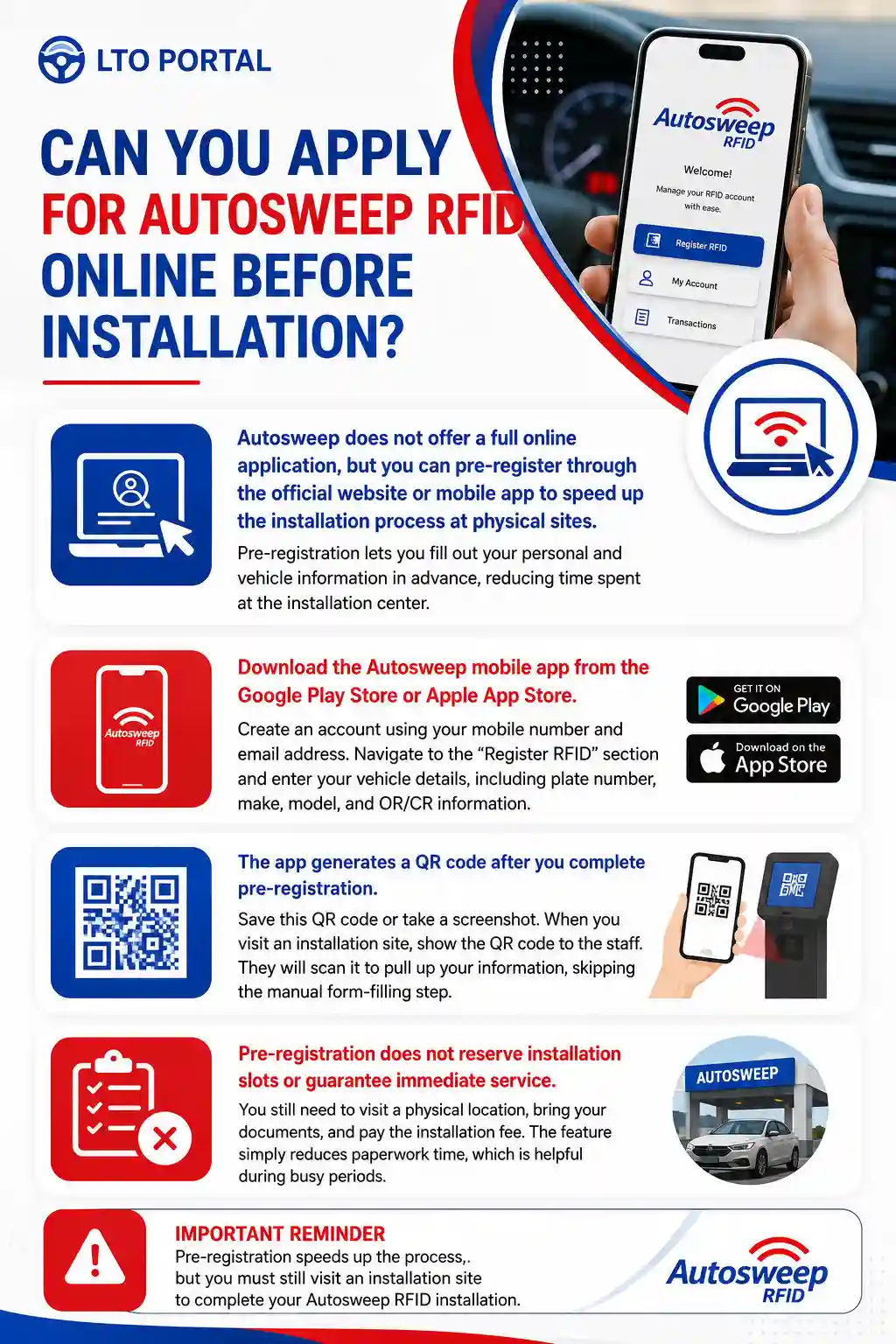
Autosweep does not offer a full online application, but you can pre-register through the official website or mobile app to speed up the installation process at physical sites. Pre-registration lets you fill out your personal and vehicle information in advance, reducing time spent at the installation center.
Download the Autosweep mobile app from the Google Play Store or Apple App Store. Create an account using your mobile number and email address. Navigate to the “Register RFID” section and enter your vehicle details, including plate number, make, model, and OR/CR information.
The app generates a QR code after you complete pre-registration. Save this QR code or take a screenshot. When you visit an installation site, show the QR code to the staff. They will scan it to pull up your information, skipping the manual form-filling step.
Pre-registration does not reserve installation slots or guarantee immediate service. You still need to visit a physical location, bring your documents, and pay the installation fee. The feature simply reduces paperwork time, which is helpful during busy periods.
How Do You Reload Your Autosweep RFID Balance?
You can reload your Autosweep RFID through mobile wallets like GCash and Maya, online banking platforms, toll plaza reload booths, and partner retail outlets across the Philippines. Each method has different processing times and convenience levels, so choose based on your location and urgency.
Reload Using GCash
Open the GCash app and tap “Pay Bills.” Search for “Autosweep” in the billers list. Enter your RFID account number, which was sent via SMS after installation. Input the amount you want to load, with a minimum of ₱100. Review the details and tap “Confirm.”
GCash reloads typically reflect within 30 minutes, though some users report delays of up to two hours during peak times. Always reload at least four hours before your planned trip to ensure the balance is available when you need it.
Reload Using Maya (Formerly PayMaya)
Launch the Maya app and select “Bills Payment.” Find “Autosweep RFID” under the Transportation or Toll category. Enter your account number and the reload amount. Confirm the transaction using your Maya PIN or biometric authentication.
Maya reloads also process within 30 minutes to two hours. Check your balance through the Autosweep app or website before entering the expressway to confirm the reload succeeded.
Reload Using Online Banking
BDO, BPI, UnionBank, Security Bank, Metrobank, and most major banks support Autosweep reloads through their online and mobile banking platforms. Log in to your bank app, navigate to “Pay Bills” or “Billers,” and search for Autosweep. Enter your account number and reload amount, then authorize the transaction.
Bank reloads can take 24 hours to process, making them less ideal for urgent top-ups. Use this method when you are planning rather than needing immediate balance access.
Reload at Toll Plaza Booths
Drive to the reload lane at any Autosweep-operated toll plaza. Hand cash to the booth attendant along with your RFID account number or plate number. The attendant will process the reload and provide a receipt. The balance updates immediately, letting you continue your trip without delay.
Reload booths accept cash only. Bring exact denominations when possible, as some booths run short on change during busy periods. This method is best for emergency reloads when your balance runs low mid-trip.
Reload at Partner Retail Outlets
Select 7-Eleven, Cebuana Lhuillier, and SM Bills Payment centers accept Autosweep RFID reloads. Visit the counter, provide your account number, and pay the reload amount in cash. The cashier will issue a receipt. Balance updates can take one to four hours depending on the outlet’s system connectivity.
Retail reload is convenient when you are running errands but need more patience than e-wallet or toll booth methods due to processing delays.
How Do You Check Your Autosweep RFID Balance?
You can check your Autosweep balance through the mobile app, the official website, LED displays at toll plazas, SMS inquiry service, or by calling the customer service hotline. Regular balance checks help you avoid insufficient balance incidents that cause toll gate delays.
Check Balance Using the Mobile App
Open the Autosweep app and log in with your registered mobile number. The home screen displays your current balance prominently. You can also view recent transactions, including toll gate location, date, time, and amount deducted. The app refreshes balance data in real time, making it the most accurate checking method.
Check Balance Through the Website
Visit the official Autosweep website and log in to your account. Navigate to the dashboard or balance inquiry section. Enter your account number or plate number if prompted. The website shows your current balance and transaction history for the past 90 days. Download transaction reports for expense tracking or reimbursement purposes.
Check Balance at Toll Plazas
Every time you pass through a toll gate, the LED screen displays your remaining balance after the transaction. Take note of this amount to estimate when you need to reload. This method requires no internet connection and works even if you have not installed the mobile app.
Check Balance via SMS
Some installation sites provide SMS inquiry services. Text BALANCE to the designated short code number provided during your RFID registration. You will receive an automated reply with your current balance and last transaction details. Data charges may apply depending on your mobile plan.
Check Balance by Calling Customer Service
Dial the Autosweep customer service hotline at (02) 8318-3300. Follow the voice prompts to reach the balance inquiry option. Provide your account number or plate number when asked. The automated system or customer service representative will inform you of your current balance. Hotline hours are 24/7, but expect longer wait times during peak periods like holidays and long weekends.
What Documents Do You Need for Autosweep RFID Installation?
You need the original Certificate of Registration (OR/CR) for your vehicle and one valid government-issued ID to complete Autosweep RFID installation. If you are not the registered owner, you must also bring an authorization letter signed by the owner along with a photocopy of the owner’s ID.
Certificate of Registration (OR/CR)
The OR/CR proves you legally own or operate the vehicle. The document must be original and current. Expired registrations are not accepted. The plate number on the OR/CR must match the vehicle you bring for installation. Photocopies or pictures of the OR/CR do not meet requirements.
If you recently renewed your registration but have not received the new OR/CR, bring your official receipt from LTO Portal showing the renewal transaction. Some installation sites accept this temporary proof, but call ahead to confirm their policy.
Valid Government-Issued ID
Acceptable IDs include driver’s license, passport, Unified Multi-Purpose ID (UMID), PhilHealth ID, SSS ID, postal ID, PRC ID, or any government agency-issued identification card. The ID must be unexpired and show your photo, full name, and signature.
Company IDs, student IDs, and barangay IDs are not accepted. If you are using an older ID that lacks an expiration date, like some postal IDs issued before 2018, staff may accept it, but bring a backup ID to avoid issues.
Authorization Letter (If Applicable)
If you are installing RFID on a vehicle you do not own, secure a signed authorization letter from the registered owner. The letter should include the owner’s full name, the vehicle’s plate number, your full name, and a statement permitting you to install RFID on the vehicle. The owner must sign the letter and provide a photocopy of their valid ID.
Notarization is not required at most installation sites, though some provincial locations may request it. To avoid complications, have the letter notarized before visiting the installation center.
How Much Does Autosweep RFID Installation Cost in 2026?
Autosweep RFID installation costs ₱200 as of 2026, plus a mandatory initial load of at least ₱300, bringing the total minimum out-of-pocket expense to ₱500. The ₱200 fee covers the RFID sticker, installation service, and account activation. The initial load goes directly into your prepaid balance and can be used for toll payments immediately after account activation.
| Item | Cost | Purpose |
|---|---|---|
| RFID Sticker | ₱200 | Includes installation and activation |
| Initial Load | ₱300 Minimum | Prepaid balance for toll payments |
| Total Minimum | ₱500 | Combined upfront cost |
You can load more than ₱300 during installation. Many drivers choose to load ₱500 or ₱1,000 to reduce the frequency of reloading. The maximum single reload amount is ₱10,000, and the maximum account balance is ₱25,000. No monthly fees or subscription charges apply to Autosweep RFID accounts.
Are There Additional Fees After Installation?
Autosweep does not charge monthly maintenance fees, annual renewal fees, or transaction fees. The only costs you pay are the initial installation and the toll fees deducted when you use the expressways. Reloading is free when you use online methods like GCash or bank transfers. Some retail outlets may charge a small convenience fee, typically ₱5 to ₱10 per transaction, but this is rare.
If your RFID sticker gets damaged or stops working, replacement costs ₱100 plus a new initial load. Lost or stolen RFID accounts can be blocked by calling customer service. You will need to visit an installation site to get a new sticker and transfer any remaining balance from the old account.
Can You Use Autosweep RFID on Easytrip Expressways?
Autosweep RFID now works on select Easytrip expressways like NLEX and SCTEX through the RFID interoperability program launched in 2024, but not all lanes accept both systems yet. The program aims for full integration by mid-2026, allowing drivers to use one RFID tag across all major expressways in the Philippines.
As of early 2026, Autosweep tags work at designated interoperable lanes marked with both Autosweep and Easytrip logos. These lanes are available at major entry and exit points on NLEX, including Balintawak, Bocaue, and Santa Rita. Full rollout to all lanes and toll plazas is ongoing, with completion expected by the third quarter of 2026.
If you frequently travel on both SMC and MPTC expressways, check lane signage before entering. Some lanes still accept only one RFID system. Using the wrong lane can cause delays while staff manually process your payment. The safest approach is to have both Autosweep and Easytrip RFID stickers until full interoperability is achieved.
How to Link Autosweep and Easytrip Accounts
Account linking is not required for interoperability to work. Your Autosweep RFID tag automatically communicates with interoperable toll readers on Easytrip expressways. The toll fee is still deducted from your Autosweep account balance, not a separate Easytrip account. You reload your Autosweep balance the same way regardless of which expressway you use.
What Should You Do If Your Autosweep RFID Is Not Working?
If your Autosweep RFID fails to read at toll gates, check that your sticker is clean and undamaged, your account balance is sufficient, and your account is active by logging into the app or website. Most RFID issues stem from low balance, dirty stickers, or improper installation, all of which can be fixed quickly.
Clean Your RFID Sticker
Dust, dirt, and grime on your windshield can block the RFID signal. Wipe the sticker gently with a soft, damp cloth. Do not use harsh chemicals or abrasive materials that could scratch the surface or damage the chip inside. Let the sticker air dry before driving through a toll gate again.
Check Your Account Balance
Open the Autosweep app or website to view your current balance. If it is below the minimum toll fee for your route, the system will not let you pass. Reload your account immediately using GCash, Maya, or online banking. Wait at least 30 minutes for the reload to process before attempting to use RFID lanes again.
Verify Your Account Status
Log in to your Autosweep account and check if it is active. Accounts can be deactivated due to prolonged inactivity, failed reload attempts, or system errors. If your account shows as inactive, call customer service at (02) 8318-3300 to request reactivation. You may need to visit an installation site if the issue cannot be resolved remotely.
Check Sticker Placement
RFID stickers must be placed correctly to work. For cars, the sticker should be on the upper center windshield, just below the rearview mirror. For motorcycles, it should be on the front headlight assembly. If the sticker is positioned too low, too high, or off to the side, the toll reader may not detect it. Visit an installation site to have the sticker repositioned or replaced if needed.
Replace a Damaged Sticker
Cracks, peeling, or water damage can render an RFID sticker unreadable. If you notice physical damage, visit any Autosweep installation site for a replacement. Bring your vehicle, OR/CR, and valid ID. The replacement fee is ₱100 plus a minimum reload of ₱300. Staff will remove the old sticker and install a new one.
How Long Does Autosweep RFID Activation Take?
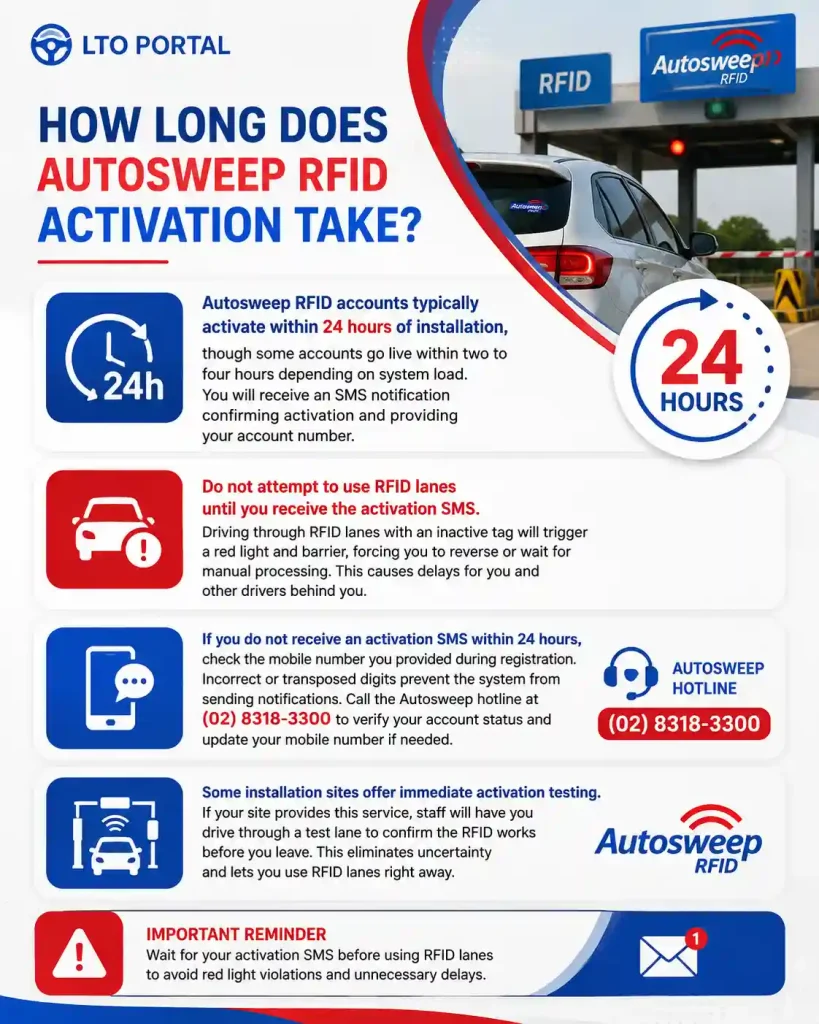
Autosweep RFID accounts typically activate within 24 hours of installation, though some accounts go live within two to four hours depending on system load. You will receive an SMS notification confirming activation and providing your account number.
Do not attempt to use RFID lanes until you receive the activation SMS. Driving through RFID lanes with an inactive tag will trigger a red light and barrier, forcing you to reverse or wait for manual processing. This causes delays for you and other drivers behind you.
If you do not receive an activation SMS within 24 hours, check the mobile number you provided during registration. Incorrect or transposed digits prevent the system from sending notifications. Call the Autosweep hotline at (02) 8318-3300 to verify your account status and update your mobile number if needed.
Some installation sites offer immediate activation testing. If your site provides this service, staff will have you drive through a test lane to confirm the RFID works before you leave. This eliminates uncertainty and lets you use RFID lanes right away.
Can You Transfer Your Autosweep RFID to Another Vehicle?
Autosweep RFID stickers cannot be transferred from one vehicle to another because they are designed for single-use installation and the adhesive damages the chip if removed. If you sell your vehicle or change cars, you must apply for a new RFID for the new vehicle and deactivate the old account.
Deactivating Your Old RFID Account
Call the Autosweep customer service hotline at (02) 8318-3300 and request account deactivation. Provide your account number and explain that you sold the vehicle or no longer use it. The representative will deactivate the account and inform you if any balance remains.
The remaining balance can be refunded or transferred to a new RFID account. For refunds, you need to visit an Autosweep office with your OR/CR, valid ID, and the deactivation confirmation. Refund processing takes 10 to 15 business days. For balance transfers, the representative will move the amount to your new RFID account after you provide the new account number.
Installing RFID on Your New Vehicle
Follow the same installation process outlined earlier. Visit an installation site, bring the new vehicle’s OR/CR and your valid ID, complete the registration form, pay the installation fee, and load the initial balance. If you transferred balance from your old account, inform the staff so they can verify the transfer before you reload additional funds.
What Are Common Autosweep RFID Problems and Solutions?
The most common Autosweep RFID problems are insufficient balance, dirty or damaged stickers, incorrect installation, account deactivation, and system errors at toll plazas. Most issues can be fixed within minutes if you know the right steps to take.
Problem: Insufficient Balance
This happens when your account balance is lower than the toll fee for your route. The toll gate barrier will not open, and the LED screen will display “Insufficient Balance.” Reload your account immediately using GCash, Maya, or online banking. If you are already at the toll gate, ask the booth attendant to process a manual cash payment and reload your account at the next opportunity.
Problem: RFID Not Detected
The toll reader fails to detect your RFID tag, showing “Tag Not Read” or “Invalid Tag.” Check if your sticker is clean and properly positioned. If the problem persists, your sticker may be damaged. Visit an installation site for a replacement. In the meantime, use cash lanes to avoid holding up traffic.
Problem: Double Charging
Your account is charged twice for a single toll transaction. This usually happens due to system glitches during peak hours. Check your transaction history in the app or website. If you see a duplicate charge, call customer service immediately with the transaction date, time, toll plaza, and charged amounts. Refunds for double charges typically process within five to seven business days.
Problem: Account Locked or Deactivated
Your account becomes inactive due to prolonged non-use, failed reload attempts, or security flags. Log in to your account to check the status. If it shows as inactive, call customer service to request reactivation. You may need to verify your identity by providing your OR/CR number and registered mobile number.
Problem: SMS Notifications Not Received
You do not receive balance alerts or transaction confirmations via SMS. Verify that the mobile number registered to your account is correct. Log in to the app or website and update your contact information if needed. If your number is correct but you still do not receive SMS, check if your phone has blocked short code numbers. Adjust your phone settings to allow messages from all senders.